
Danish Cookie Guidelines
If you run a website or app in Denmark, you need to follow the Danish rules for cookies and tracking technologies. This article gives you a clear overview of the rules – and how to collect valid user consent.
What are the Danish cookie guidelines?
The Danish cookie guidelines are among the strictest in Europe. They are based on two separate but overlapping laws:
• Cookiebekendtgørelsen – the Danish implementation of the EU ePrivacy Directive
• The General Data Protection Regulation (GDPR)
So if your website or app sets cookies you’ll likely need to comply with both.
Because cookies can do two things:
- Access data on a user’s device, which triggers the cookie rules.
- Process personal data, which triggers the GDPR.
But actually, cookies aren’t just cookies. The rules actually cover what’s technically called “access and storage technologies” – commonly referred to as “cookies and similar technologies.”
These similar technologies include things like:
- Pixels
- Tags
- Fingerprinting
- Device IDs
- App tracking technologies
That’s why it’s better to see the cookie guidelines as general legal rules for tracking and data processing – not just for cookies.
When does Cookiebekendtgørelsen apply?
Cookiebekendtgørelsen (Executive Order no. 1148 of 09/12/2011) applies when you use cookies or similar technologies on your website or app to store or access any kind of information on a user’s device.
This also applies when third parties store or access the information on your behalf.
The Danish Agency for Digital Government (Digitaliseringsstyrelsen) is responsible for supervising compliance with this law.
When does the GDPR apply?
The General Data Protection Regulation (GDPR) applies in two cases:
- When you use cookies or similar technologies to store or access personal information on a user’s device.
- When you process personal information – no matter how it was collected.
The first case is where Cookiebekendtgørelsen and the GDPR overlap. The key difference is whether the data being stored or accessed qualifies as personal information.
Datatilsynet (the Danish Data Protection Authority) is responsible for enforcing the GDPR in Denmark.
What is ‘personal information’?
Personal information includes any data that can identify a person – either directly or indirectly. This can include:
- Names
- Email addresses
- ID numbers
- IP addresses
- Location data
- Device IDs
- Genetic or biometric data
Do I need consent?
As a general rule, yes.
Cookiebekendtgørelsen requires you to get informed consent whenever you use cookies or similar technologies to store or access information on a user’s device.
The same applies under the GDPR if the information being stored or accessed is personal.
However, you don’t need consent for cookies or similar technologies that are strictly necessary for your website or app to work – as long as the data isn’t used for anything beyond ensuring that functionality.
Examples of strictly necessary technologies
These are technologies that are essential for your website or app to function properly:
- Login and user authentication
- Shopping cart functionality
- User-defined settings (like language or region)
- Session authentication technologies
- Load balancing technologies

How to collect valid cookie consent in Denmark
On websites and apps, you typically collect consent through a cookie banner (also called a consent banner). But simply showing a banner isn’t enough.
Ask for consent before setting cookies
You must get the user’s consent before setting cookies. This is one of the most common mistakes we see.
Only strictly necessary cookies can be placed before consent.
Keep a consent log
You should keep a record of consents. This helps you demonstrate when and how consent was given – if asked by users or the authorities.
Store only the information you need, and keep it only as long as necessary.
What makes cookie consent valid?
To be valid under Danish law, consent must meet several key conditions:
1. Freely given
Users must have a real choice – including the ability to say no.
Tip: Avoid nudging
You must not pressure or steer users toward giving consent. For example:
- Don’t repeatedly show the consent prompt.
- Don’t use language that encourages agreement.
- Don’t highlight the “Accept” button using size or color.
- Don’t hide or downplay the “Reject” button.
Both buttons should be equally visible and accessible.
2. Specific
You must explain exactly what you’re using the data for and what kind of data is involved.
Tip: Give granular options
Users must be able to give or refuse consent by purpose or category – not all or nothing. Common categories include:
- Functional
- Statistical
- Marketing
3. Informed
Users need enough information to make a choice. At a minimum, you must tell them:
- Who you are (and who your partners are)
- Why you’re collecting the data
- What kind of data you’ll collect and process
- That they can withdraw consent at any time
This information should appear in both the banner and the cookie policy.
4. Unambiguous
Consent must be a clear, deliberate action – like clicking a button. You can’t assume consent based on passive behavior like browsing.
Tip: Don’t use pre-ticked boxes
Consent options must not be pre-selected or toggled on by default.
5. Easy to withdraw
Users must be able to withdraw consent just as easily as they gave it.
A fixed icon, link, or widget labeled “Change consent” on all pages is a good solution.
3 cookie banners that don’t comply with the rules
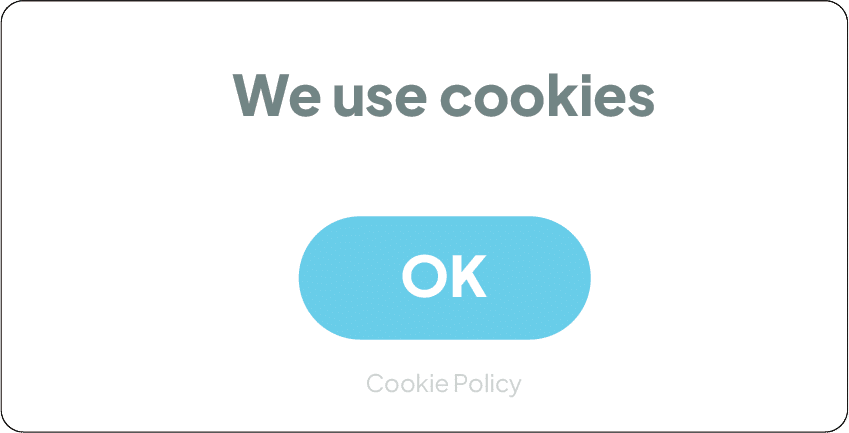
Example #1

Freely given
Specific
Informed
Unambiguous
Issues:
- Only a single “OK” button – no way to reject cookies.
- No granular control for different purposes.
- The banner does not explain what kind of cookies are being used or why.
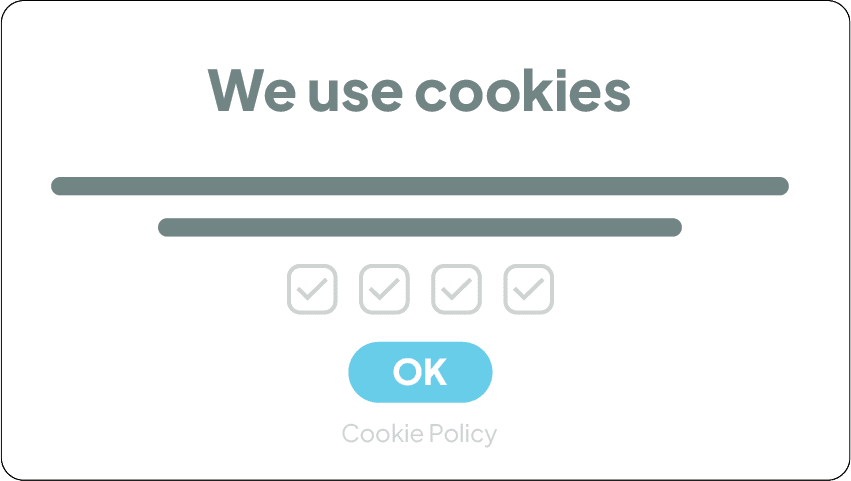
Example #2
Freely given
Unambiguous
Issues:
- Still only one button – no way to clearly reject all cookies.
- All checkboxes are pre-ticked, which invalidates consent.
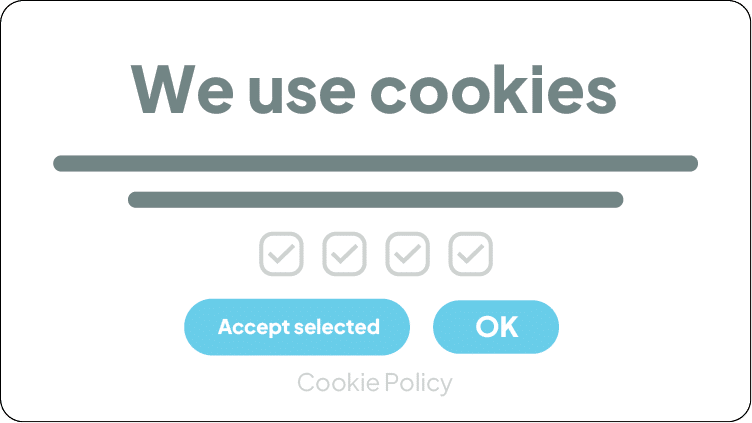
Example #3
Freely given
Specific
Informed
Unambiguous
Issues:
- No “Reject” button. User can’t clearly decline.
- All checkboxes are pre-ticked, which violates the opt-in requirement.
- “Accept selected” is misleading – implies control, but defaults are already selected.
- No clarity on the difference between the two buttons – creates confusion and undermines informed consent.
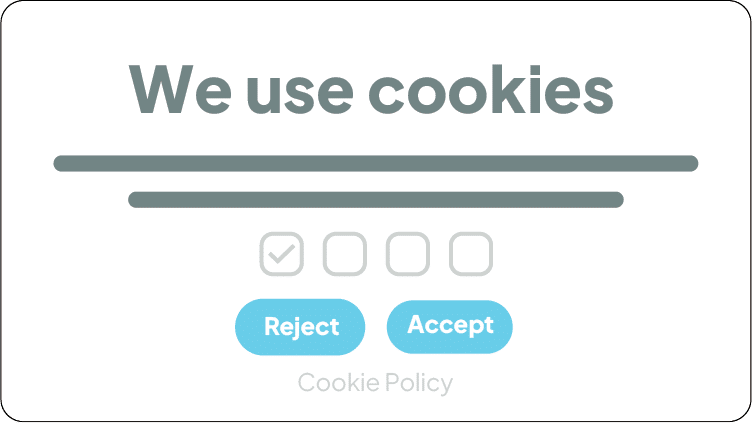
This is what a compliant cookie banner looks like
Freely given
Specific
Informed
Unambiguous
Why it works:
- The banner presents two clearly labeled and equally styled buttons: “Accept” and “Reject.” This gives the user a real, balanced choice.
- The user can choose which types of cookies or technologies to allow.
- The banner includes a link to the cookie policy.
- Nothing is pre-ticked except one box, which is for strictly necessary cookies.
Will the Danish cookie guidelines hurt your marketing?
Not at all – if you do it right.
With a Consent Management Platform (CMP) like Cookie Information, you can collect valid consent while keeping your analytics and ad tools running compliantly.
Our CMP offers:
- A transparent and customizable cookie banner
- Consent collection by purpose and vendor
- Seamless updates to match legal changes
- Built-in support for Google Consent Mode v2 to help you keep key marketing insights even when users opt out
When users trust you, they are more likely to engage – and share their data. Compliance and performance can go hand in hand.
Try Cookie Information
Cookie Information’s CMP enables you to protect user privacy without compromising your marketing goals. And right now, you can test it out for 14 days. Completely free, with no commitments.
Frequently Asked Questions
What are the consequences of not complying with the Danish cookie guidelines?
If you don’t follow the rules, you risk legal action – including fines or penalties – from the Danish Data Protection Agency (Datatilsynet) or the Agency for Digital Government (Digitaliseringsstyrelsen). It also puts your company’s reputation and user trust at risk.
Are any cookies exempt from the Danish cookie rules?
Yes. Cookies that are strictly necessary to make your website work – like remembering login status, keeping items in a cart, or loading the right language version – might be exempt from consent requirements.
But in any case, you still have to disclose them in your cookie policy. These cookies must not collect data for analytics, marketing, or profiling.
Where can I stay updated on the Danish cookie rules?
The guidelines can change and evolve. It’s advisable for website owners and users to stay informed, and follow updates from:
- Datatilsynet
- Digitaliseringsstyrelsen
- Our own guides and blog at Cookie Information
How does the Danish cookie guidelines align with the GDPR?
The Danish cookie guidelines are designed to align with the broader requirements of the GDPR, particularly in terms of consent and data protection.
What if I don’t use cookies on my website?
Most websites use cookies – either directly or through tools like Google Analytics, Facebook Pixel, or embedded services (like YouTube, Instagram, or LinkedIn).
Even if you don’t set cookies yourself, third-party services on your site might. That still makes you responsible for getting consent.
What if my website doesn’t collect personal data?
It may not look like it does – but many third-party tools do, even without you realizing it. Tools like Google Analytics or social media plugins often collect data that qualifies as personal under GDPR.
If these tools are installed on your site, you are considered the data controller and must get valid consent.
Can we use Google Analytics without consent?
No. Google Analytics uses cookies to collect data like IP addresses, device info, and behavior. This is personal data – and under both Cookiebekendtgørelsen and GDPR, you must ask for consent before using it.
What are technically necessary cookies?
These are cookies that are essential for the website to function properly. For example:
- Keeping a user logged in
- Saving shopping cart contents
- Delivering the site in the correct language
They do not include tools like Google Analytics, Facebook Pixel, or marketing cookies.
You can use technically necessary cookies without consent – but you must be sure they are used only for those essential functions.
How do I know what cookies my website uses?
We’ve written a guide, which you can read here.
Other options include:
- Use your browser’s developer tools
- Use an online cookie scanner
- Ask your web developer
- Or use a Consent Management Platform (CMP) like Cookie Information, that automatically scans and categorizes cookies for you
Knowing what’s running on your site is the first step to staying compliant.


