
What is a cookie banner?
A cookie banner is the pop-up that asks visitors whether they consent to your website’s cookies before they’re set. It exists because of EU privacy law – but installing one isn’t the same as being compliant. Here’s how cookie banners actually work, what makes one legal under GDPR, and where most websites get it wrong.
Cookie banner, in one sentence
A cookie banner is a notice that appears when someone visits your website, telling them what cookies and tracking technologies your site uses and asking for their consent before any non-essential ones load.
In the EU and UK, you’re legally required to have one if your site uses cookies for analytics, marketing, or anything beyond what’s strictly necessary to deliver the service.
Also called: cookie consent banner, consent pop-up, GDPR cookie notice, cookie consent form. They all refer to the same thing.
First, what’s a cookie?
A cookie is a small text file that a website stores on your device when you visit it. It holds a piece of information – a session ID, a language preference, a tracking identifier – that the site can read back later to recognise you, remember your settings, or measure your behaviour. Cookies are why a shopping cart still has items in it after you navigate away, why a site remembers you’re logged in, and why an ad you saw on one site can follow you to another.
Types of cookies
Cookies are categorised along three different axes – and any given cookie sits on all three.
By purpose:
- Strictly necessary – required for the site to work (login, security, basic navigation). No consent needed.
- Functional – remember preferences (language, region, accessibility). Consent usually required.
- Analytics – measure how visitors use the site. Consent required in the EU/UK.
- Marketing – track behaviour to serve targeted ads. Consent required.
By origin:
- First-party – set by the website you’re visiting. Generally lower-risk, often essential.
- Third-party – set by another domain (an ad network, an embedded video, an analytics provider). These are what regulators scrutinise most.
By lifespan:
- Session cookies – deleted automatically when you close your browser.
- Persistent cookies – stay on your device until they expire or you delete them. Lifespans range from minutes to years.
Only strictly necessary cookies can load before consent. Everything else needs the visitor’s explicit OK – which is exactly what a cookie banner is for. Learn how cookie blocking actually works >

Why do websites need a cookie banner?
Two pieces of EU law require it:
- The ePrivacy Directive (2002, updated 2009) – also called the “EU Cookie Law.” Article 5(3) says you can’t store information on someone’s device, or read information already stored there, without their prior informed consent. Cookies, pixels, fingerprinting, local storage – they all fall under this rule.
- The General Data Protection Regulation (GDPR, 2018) – defines what valid consent looks like: freely given, specific, informed, and unambiguous, given by clear affirmative action. No pre-ticked boxes, no implied consent from continued browsing.
Together, these two laws mean: if your site uses any cookie or tracker that isn’t strictly necessary, you need a banner that asks first and stores the answer.
Outside the EU/UK: California (CCPA/CPRA), Brazil (LGPD), Thailand (PDPA), and a growing list of other jurisdictions have their own consent requirements. They’re not identical to GDPR, but a properly built banner can comply with all of them.
What does a cookie banner actually do?
A compliant cookie banner does four things:
- Informs. Tells visitors what cookies the site uses, what each one is for, who sets it, and how long it lasts.
- Blocks. Holds non-essential cookies and trackers until the visitor makes a choice. No tracking before consent.
- Records. Logs the choice – when it was given, what was selected, what version of the banner was shown – so you can prove consent if a regulator asks.
- Lets users change their mind. Provides a way to update or withdraw consent at any time, as easily as it was given.
If your banner only does the first one – informs but doesn’t block – it’s not compliant. That’s the most common gap, and it’s what most data protection authorities (DPAs) flag in audits.
Cookie banner ≠ compliance – the gap most teams miss
Most companies install a cookie banner and assume the box is ticked. It usually isn’t.
In its 2024 review of the UK’s top 200 websites, the ICO contacted 134 of them – roughly two-thirds – about non-compliant cookie practices. When the ICO expanded the review to the top 1,000 in 2025, only 415 sites passed without intervention; 564 had to be told to fix issues, and 17 received preliminary enforcement notices.
France’s CNIL has issued formal warnings to dozens of websites for misleading designs.
The Belgian DPA has ordered publishers to fix their banners under threat of daily fines.
Sweden’s privacy authority has issued formal warnings to major companies over misleading cookie banners that failed to meet legal standards. The Danish DPA made cookie consent a 2026 enforcement priority.
Common ways a banner fails compliance even when it’s installed
- Cookies fire before consent. Analytics, ads, embedded video – they load the moment the page does. The banner is purely cosmetic.
- No “reject all” on the first layer. Users have to click through a settings menu to refuse, while “accept all” is one click. The European Data Protection Board (EDPB) guidance says this isn’t valid consent.
- Pre-ticked boxes. GDPR Article 4(11) and the Planet49 ruling (CJEU C-673/17) made these unlawful. Many banners still use them.
- Dark patterns. Reject button in faint grey, accept button in bright blue. Different sizes, different prominence. CNIL has actively fined for this.
- No consent records. When the DPA asks for proof, there’s nothing to hand over.
- No re-scanning. A banner installed two years ago doesn’t know about the 14 new tools your team has added since.
The uncomfortable truth: Having a banner doesn’t mean you’re compliant. Having the right banner, configured properly, and kept current does.
Not sure if your banner is actually compliant?
Run a free scan to see what’s firing on your site, what consent looks like to a regulator, and where the gaps are.
What makes a cookie banner GDPR-compliant?
The EDPB’s Cookie Banner Taskforce (2023 report) and the GDPR/ePrivacy Directive together define what a compliant GDPR cookie banner must do. The core requirements:
Before consent
- Block all non-essential cookies and trackers until the user makes an explicit choice. Strictly necessary cookies (session, security, load balancing) can load.
- Show the banner on the first page load, not after the visitor has already triggered tracking.
On the banner itself
- Equal prominence for accept and reject on the first layer. Same size, same colour weight, same position. (Belgian DPA, CNIL, ICO have all enforced on this.)
- No pre-ticked boxes. All consent toggles for non-essential categories must be off by default.
- Granular categories. Visitors must be able to consent to some cookie purposes (e.g. statistics) and refuse others (e.g. marketing).
- Plain language. Clear explanation of what cookies are used, why, and what happens if the visitor accepts or refuses.
- No cookie walls. Access to the site (or its content) cannot be conditional on accepting cookies. The EDPB has been explicit on this.
After consent
- Re-prompt if scope changes. New cookies, new purposes, new third-party tools = new consent.
- Record the consent with timestamp, version, and what was chosen – exportable for audits.
- Make withdrawal as easy as giving. Persistent icon or link, same number of clicks to withdraw as to consent.
Cookie banner design – what the rules actually require
Design isn’t just aesthetics – it’s a compliance question. The EDPB and national DPAs have been clear that a banner’s visual design must not nudge users toward consent.
What’s not allowed:
- Reject button in low-contrast colour while accept is bright.
- Reject hidden behind “More options,” “Customize,” or a settings icon while accept is on the first layer.
- Confusing wording like “I decline non-essential purposes” instead of a plain “Reject all.”
- Multiple accept buttons and one reject.
- Banners that re-appear constantly until the user accepts (consent fatigue).
What good design looks like:
- Branded styling that fits the site, without sacrificing legibility.
- Two equally prominent buttons: “Accept all” and “Reject all,” same first layer.
- Optional third button: “Customize” or “Settings” – for granular control.
- Categories with toggles, all off by default.
- A persistent icon or link in the footer to reopen settings.
How does a cookie banner work technically?
Behind the scenes, a cookie banner is doing three jobs at once.
1. Detection. A scanner crawls the site to find every cookie, pixel, and tracker – first-party and third-party – and classifies them by purpose (necessary, statistics, marketing, functional). Good consent management platforms (CMPs) re-scan automatically as the site changes, usually weekly or monthly.
2. Blocking. On page load, the banner script runs first and intercepts non-essential cookies and trackers. They’re held in a queue. Nothing fires until the visitor makes a choice. This is the part most non-compliant banners skip – the banner shows up, but cookies are already loading.
3. Signaling. Once the visitor consents (or doesn’t), the banner stores the choice in a local cookie or storage and signals downstream tools – Google Tag Manager, Google Consent Mode, Meta Pixel, anything tag-based – to behave accordingly. Tools that received “deny” don’t fire. Tools that received “accept” fire as normal.
Learn more:
Cookie banner and Google Consent Mode v2
Since March 2024, Google has required websites that use Google Ads, Google Analytics 4, or other Google advertising services to share consent signals via Consent Mode v2 if any of their visitors come from the EEA or UK. Without it, advertisers lose access to remarketing, audience features, and accurate conversion measurement for those users.
Consent Mode v2 introduced two new parameters on top of the original consent signals:
- ad_user_data – whether user data can be shared with Google for advertising.
- ad_personalization – whether personalised ads (remarketing) can be served.
These sit alongside the existing ad_storage and analytics_storage parameters. Together they tell Google what’s allowed for each visitor based on their consent choice.
Two modes:
- Basic (no Google tags fire until consent) and Advanced (tags fire in a limited, anonymous mode before consent, allowing conversion modelling for users who refuse).
- Advanced mode is what allows Google to recover up to ~70% of unconsented conversion paths through modelling – which can be a meaningful difference for ad spend.
What this means for your cookie banner: if you’re running paid ads in the EEA or UK, your banner must be Consent Mode v2-compatible. The cleanest way is to use a Google-certified CMP – those have Consent Mode v2 built in and Google verifies the implementation. Cookie Information is a Google CMP Gold Partner.
Learn more:
How to set up a compliant cookie banner
Five steps. Most can be done without a developer.
Re-scan weekly or daily. Review whenever you add new marketing tools, integrations, or third-party scripts. Update your cookie policy automatically from the scan.
Find every cookie, pixel, and tracker your site loads. Classify each by purpose. (Cookie Information CMP does this automatically).
Pick one that blocks cookies before consent, supports Consent Mode v2, gives you audit-ready records, and re-scans your site automatically. Avoid free WordPress plugins that don’t actually block.
Most CMPs offer cookie banner plugins for WordPress, Drupal, or other CMSs, plus a Google Tag Manager template or a single code snippet for custom sites. Setup is typically 5–15 minutes.
Set categories, ensure equal prominence for accept/reject, match your brand, write clear copy. Use a verified compliant template if you’re not sure.
Cookie banner examples – compliant vs. non-compliant
Examples of non-compliant cookie banners
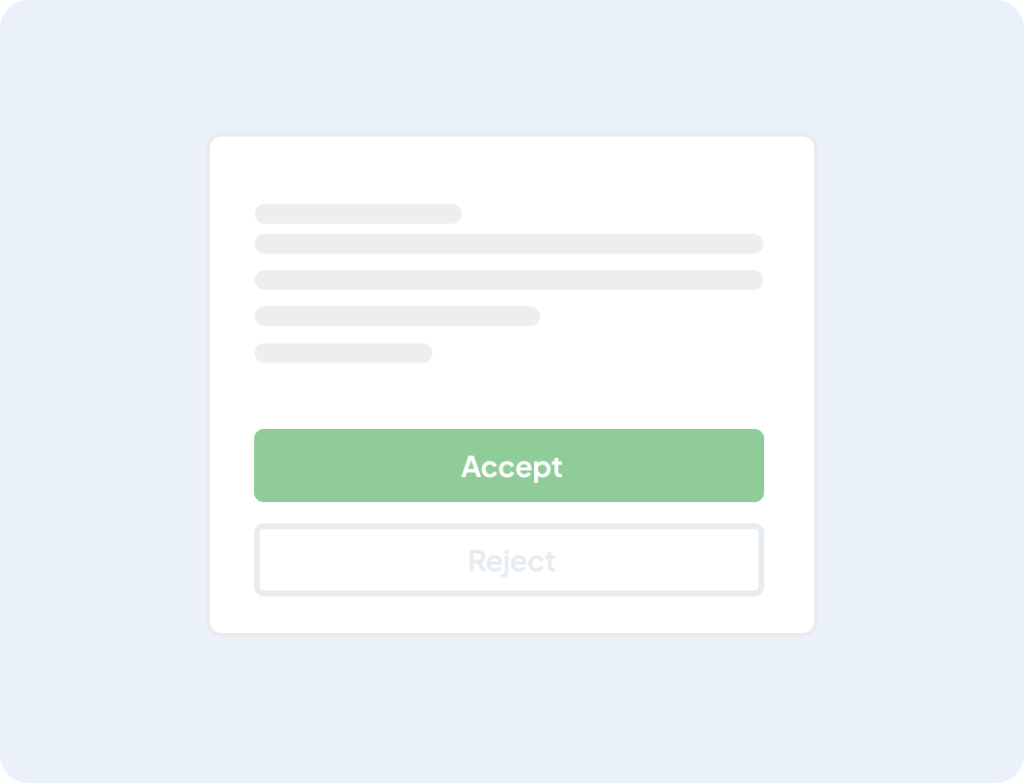
Deceptive button contrast between “Accept” and “Reject” options, a dark pattern aimed at increasing opt-ins.
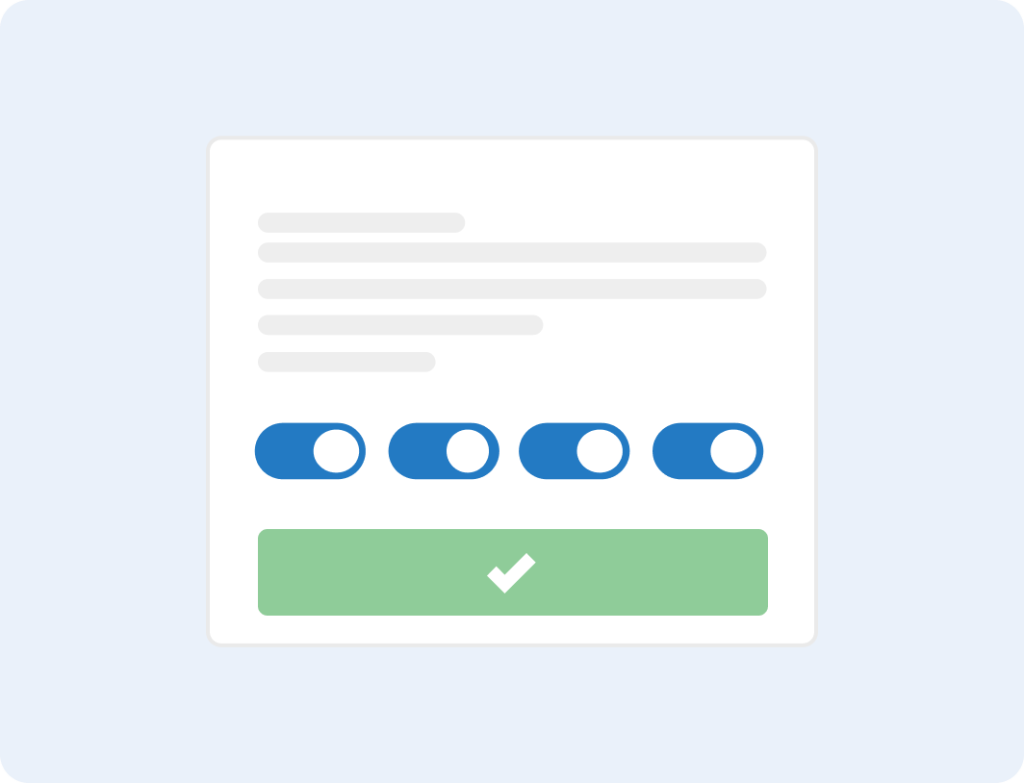
Pre-ticked boxes for all cookie categories, no option to “Reject” on the banner’s first layer, making it hard for the user to opt-out.
GDPR-compliant cookie banner example
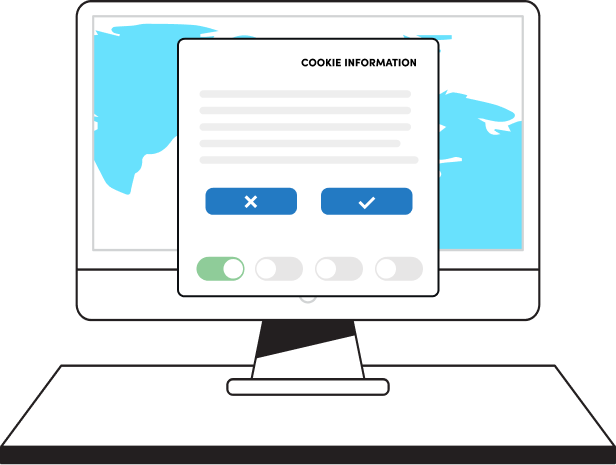
Accept” and “Reject” same size and same prominence.
Cookie categories are visible for granular choice, but all toggles are off by default, except for essential cookies.
What happens if your cookie banner isn’t compliant?
Three things, in increasing order of cost.
1. You lose data quality
Without proper Consent Mode v2 signals, Google Ads can’t model conversions for un-consenting visitors. Attribution gets noisy. Campaigns optimize on incomplete data. ROI reporting becomes guesswork.
2. You get a regulator notice
DPAs across the Nordics and EU are actively reviewing cookie banners. The Danish DPA, CNIL, ICO, and Norwegian DPA (Datatilsynet) have all issued public warnings or fines in the past year. Most start with a notice and a deadline to fix – but that means a public record and a ticking clock.
3. You face fines
Under GDPR Article 83(5), the most serious infringements – including invalid consent and breaches of basic processing principles – can be fined up to €20 million or 4% of the company’s total worldwide annual turnover for the preceding financial year, whichever is higher.
National DPAs are using this power, and 2025 was a step-change year for cookie enforcement specifically:
- On 1 September 2025, France’s CNIL hit two of them in a single day: a €150 million fine against Shein’s Irish subsidiary for placing advertising cookies before users had a chance to consent and for cookies that kept loading even after “Reject all,” and a €325 million fine against Google (split €200M against Google LLC and €125M against Google Ireland) for invalid consent collection during account creation and unconsented ads inside Gmail.
- In April 2025, Sweden’s IMY issued formal criticisms against three companies for dark-pattern banners – a softer enforcement tool, but one that goes on the public record and sets the standard for the next round of fines.
- Across the year, the CNIL alone issued 83 sanctions worth roughly €486 million, much of it tied to cookies and ad tech.
Learn more:

How Cookie Information’s cookie banner helps
Cookie Information is Northern Europe’s leading consent management platform. We build the cookie banner that handles all of the above automatically, so you don’t have to think about it after setup.
What you get:
- Verified compliant templates – equal accept/reject, no dark patterns, GDPR + ePrivacy + WCAG 2.2 ready out of the box.
- Automatic cookie scanning – weekly or daily, with classification and policy updates handled for you.
- Cookie blocking before consent – non-essential cookies and trackers are held until the visitor chooses.
- Google Consent Mode v2 built in – we’re a Google CMP Gold Partner, so signals flow correctly from day one.
- Audit-ready consent records – stored on EU servers, exportable, timestamped, versioned.
- 5-minute setup – WordPress, Drupal, Google Tag Manager, or a single code snippet.
- 44+ languages, 5,000+ organizations – including some of the largest brands in Denmark, Norway, Sweden, and Finland.
Get a compliant cookie banner in 5 minutes
Free 14-day trial. No credit card. Full access. Cancel anytime.
Frequently asked questions
Is a cookie banner legally required?
Yes, in the EU, UK, and several other jurisdictions, if your website uses any cookies or trackers beyond what’s strictly necessary. The ePrivacy Directive and GDPR both require informed, prior consent before non-essential cookies are set. Outside the EU, similar rules apply under the UK GDPR, CCPA/CPRA in California, LGPD in Brazil, and PDPA in Thailand and Singapore.
What’s the difference between a cookie banner and a Consent Management Platform (CMP)?
A cookie banner is the visible pop-up. A Consent Management Platform is the system behind it – it scans for cookies, blocks them before consent, stores the consent records, signals downstream tools, and keeps everything updated as your site changes. The banner is the front end; the CMP is the engine.
Do I need a cookie banner if I only use Google Analytics?
Yes. Google Analytics sets cookies that are not strictly necessary, so EU/UK law requires consent before they load. This applies even to GA4 with anonymised IPs – the cookies themselves still trigger the consent requirement.
Are pre-ticked boxes allowed on a cookie banner?
No. The Court of Justice of the European Union ruled in Planet49 (Case C-673/17) that pre-ticked consent boxes don’t constitute valid consent under GDPR. All toggles for non-essential cookie categories must be off by default.
Can I require visitors to accept cookies to use my website?
No. “Cookie walls” – making access conditional on accepting cookies – are not valid consent under EDPB guidance. Consent must be freely given, which means visitors need a real choice that doesn’t cost them access to the service.
How often should I update my cookie banner?
Re-scan your site at least weekly, and review the banner whenever you add a new marketing tool, embed, or third-party script. Cookie compliance isn’t a one-time setup – every new tracker can shift your compliance status.
Is Google Consent Mode v2 the same as a cookie banner?
No. Consent Mode v2 is a Google framework that receives consent signals from your banner and adjusts how Google’s tags behave. You still need a cookie banner (or CMP) to collect consent in the first place. Consent Mode v2 just makes sure that consent is correctly passed to Google.
What’s the fine for a non-compliant cookie banner?
Under GDPR Article 83(5), the most serious violations – including invalid consent under Articles 6 and 7 – can be fined up to €20 million or 4% of total worldwide annual turnover for the preceding financial year, whichever is higher.
The two biggest cookie-banner fines on record both come from France’s CNIL, both issued on 1 September 2025: €325 million against Google (for invalid consent during account creation and unconsented Gmail ads) and €150 million against Shein (for cookies firing before consent and “Reject all” not actually rejecting).
Earlier landmark cases include CNIL’s €100 million fine against Google in 2020 and €60 million against Facebook in 2022, both for asymmetric reject buttons.
Beyond CNIL, Belgian and Swedish DPAs have used compliance orders and formal criticisms for similar issues. Most enforcement starts with a formal notice and a deadline before fines escalate.
Learn more: How to choose a CMP that keeps you compliant


